Desktop app
Nine tabs. One safety model.
SweepLoom's desktop app is a native Rust (egui) reviewer for Windows, macOS and Linux. Live pressure, disk and your workspace, each in its own tab, and nothing destructive without a confirmation that lists exactly what will happen.
In this release
Redesigned around nine tabs, and much faster on big machines.
The desktop app is the part of SweepLoom that changed most since 0.1.0. Everything below is on main today.
A design system, nine tabs
Spacing scale, cards, segmented controls, status pills, stacked bars and sparklines in light and dark. Two screens merged into the tabs where they belong: project output under Cleanup, saved disk scans under History.
Per-core CPU
Every core with a short history on Overview and Sessions, with the performance / efficiency split on Apple Silicon.
iOS & Xcode from disk
Simulators read from device records first (simctl could take 40–80 s and time out), then confirmed. Orphan devices, dyld caches, unused runtimes, and Git-aware Keep / Review / Suggested verdicts.
Every project, everywhere
Discovery across all developer folders instead of the launch directory, with Xcode, Swift, JVM and .NET markers. 598 projects found where the old walk found 237.
Parallel, streaming scans
Discovery, Project output, project sizes and Explorer run on bounded worker pools and stream rows as they finish. Results survive tab switches and refreshes.
Crash log and Windows fixes
Panics are written to a log and release builds unwind, so a failed background scan no longer takes the app down. Windows paths now have one canonical shape.
| Work | Before | After |
|---|---|---|
| Project discovery | 3.2–7.7 s, 237 projects | 0.5–3.5 s, 598 projects |
| Project output across 95 repositories | 343–390 s | 52–109 s |
| Full project sizes | 194–201 s | 59–76 s |
| Explorer, ~3.7 million entries | ~358 s | 130–162 s |
How discovery and the parallel walks work: How SweepLoom finds every project on your machine.
The tour
The sidebar, tab by tab.
Same order as the app. Screenshots are real captures with names and paths blurred; tabs without one are described rather than mocked up.
Live · 1 of 9
Overview
Live pressure across memory, CPU and disk on one screen. Every tile and every session row opens the screen that explains it.
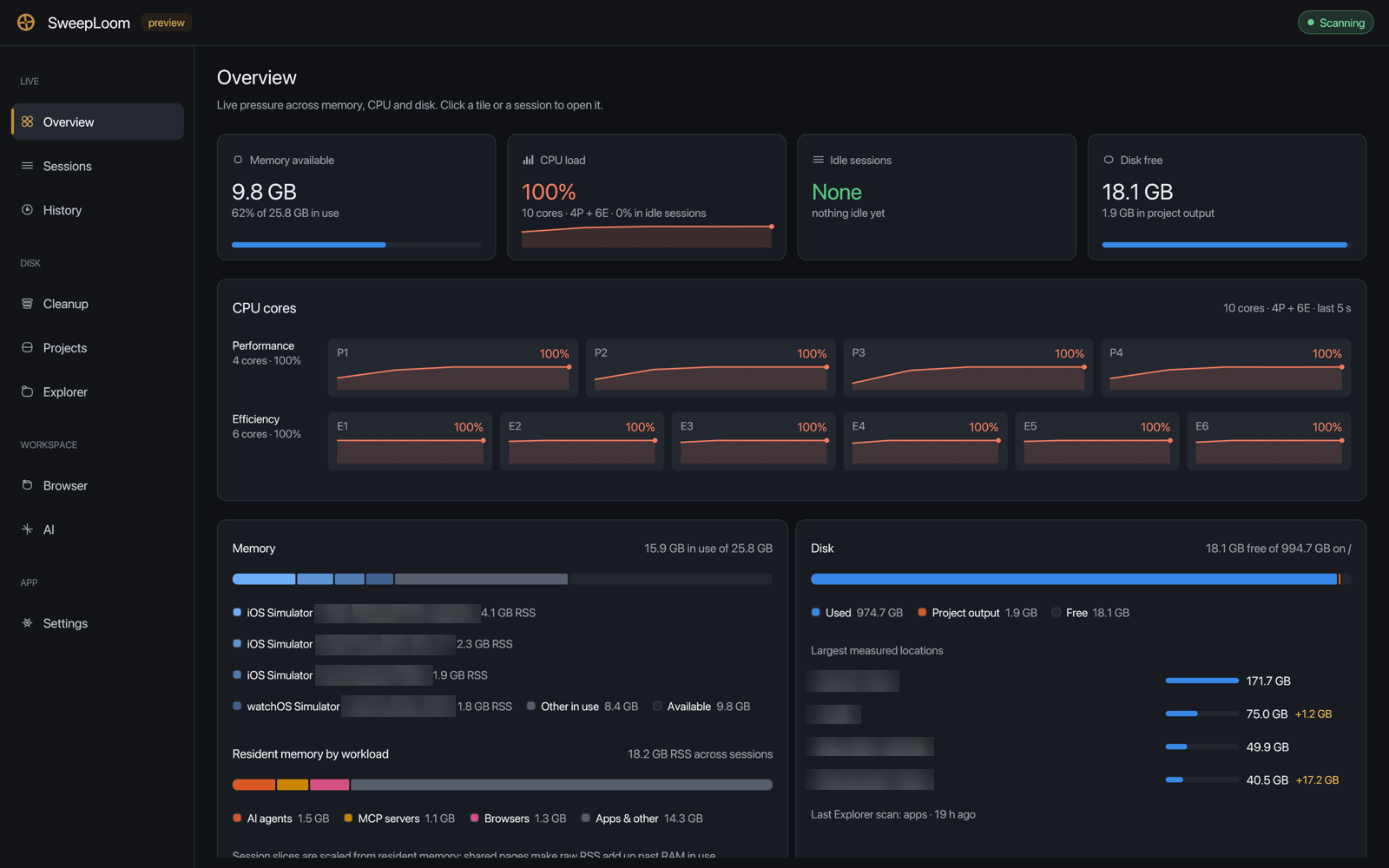
- Four tiles: memory available, CPU load with the core count, idle sessions, and free disk with the share taken by project output.
- Per-core CPU with a short history per core. On Apple Silicon, performance cores come first, then efficiency cores, read from the system's own perflevel counters; elsewhere cores appear in OS order.
- Memory split by session and by workload (AI agents, MCP servers, browsers, apps). Session slices are scaled from resident memory, because shared pages make raw RSS add up past installed RAM.
- Disk: used, project output and free, plus the largest measured locations with their change since the last scan.
Live · 2 of 9
Sessions
Processes grouped into the trees you actually run: an agent with its MCP servers, terminals, dev servers and build children, each with a Keep or Optional verdict.
3 views
Dev sessions
Agents, terminals, dev servers, simulators and their helpers.
All apps
Every running application, grouped by app.
Process tree
The ungrouped process table.
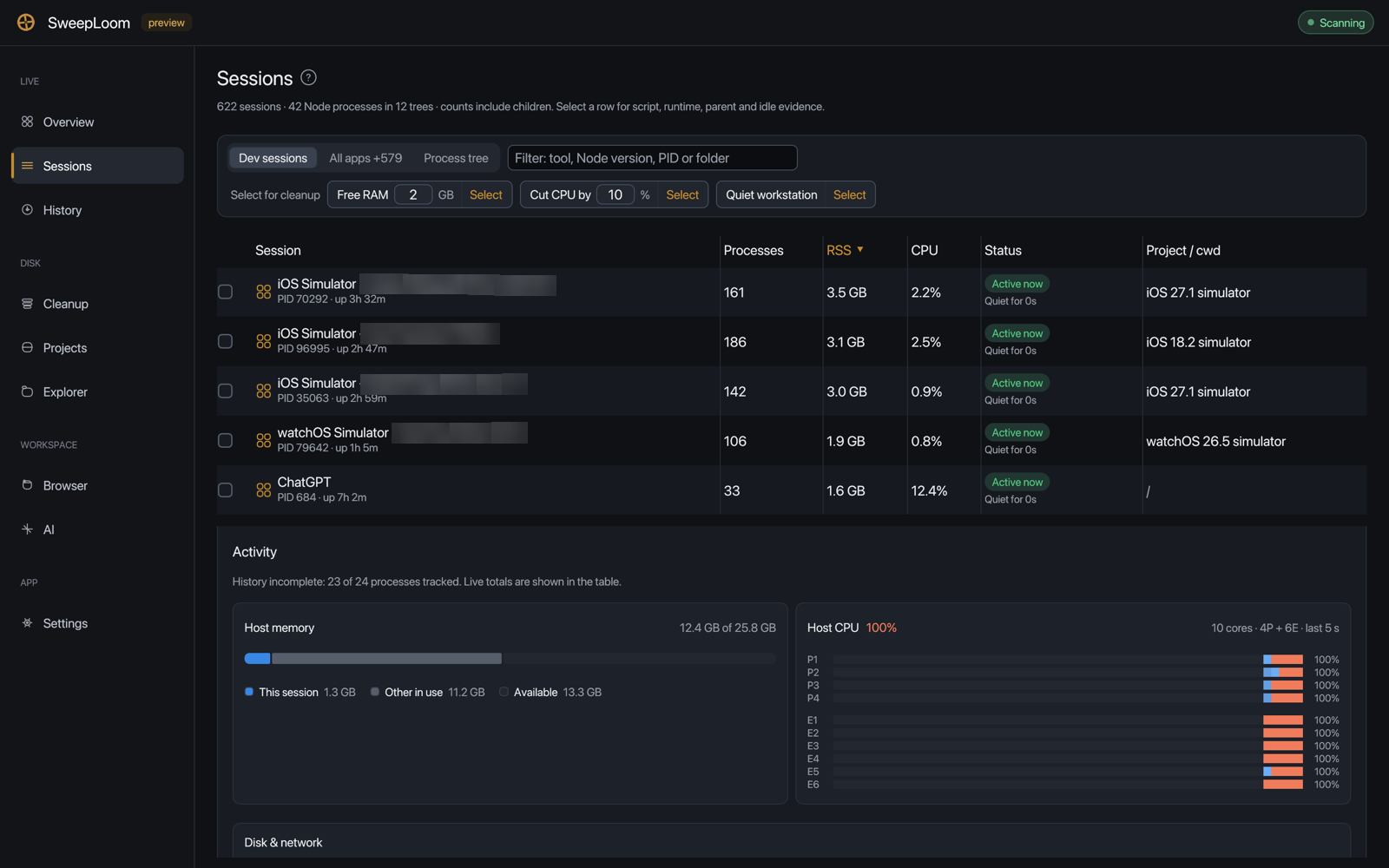
- Filter by tool, Node version, PID or folder. Select a row for its script, runtime, parent and idle evidence, observed activity, and the session's share of host memory and per-core CPU.
- The planner (Free RAM, Cut CPU by, Quiet workstation) only selects rows. Idle agents stay Keep; a recommendation never bypasses a blocker.
- Stopping anything is explicit. Terminate session, or Terminate planned… for a planner selection, asks for confirmation, freezes membership by PID plus start time, tries a graceful stop first, and warns when the project has uncommitted Git changes.
- Git state for a session's project is read off the UI thread and cached, so selecting a row never stalls the window.
Live · 3 of 9
History
What SweepLoom has actually observed, never back-filled. Two views share one tab.
2 views
Process activity
CPU and memory per session since SweepLoom started. Groups start collapsed; click a member to open its session.
Disk scans
Saved Explorer scans and folder measurements. They survive restarts, so you can see which folders grew back.
- Nothing is invented for the time before history was enabled.
- Cleanup, Projects and AI link here (Disk scans ›). Their Change column compares finished scans of the same kind.
- Only finished measurements become history samples, so a partial scan is never compared with a full one.
Disk · 4 of 9
Cleanup
One place for everything reclaimable, by source. Every row shows its origin path or native object ID, size, change since the last scan, and the consequence of removing it.
7 views
Project output
Generated builds, dependencies and temp files across your projects, with rebuild cost and safety. Applied through plan → revalidate → execute → receipt.
Docker
Images, stopped containers, unused volumes and old build cache, removed through Docker itself. In-use objects are protected.
iOS & Xcode
Simulators read from disk, then confirmed with simctl; runtimes with the devices that depend on them; leftover device folders and caches. Keep / Review / Suggested verdicts; nothing is pre-selected.
Build & packages
DerivedData per project with a Git-aware verdict, device support per OS version, and npm, pnpm, Yarn, Bun, Python, Cargo, Gradle, NuGet, Go, Homebrew, SwiftPM and Playwright caches.
App & browser caches
Application caches and exact cache subdirectories in browser, IDE and Electron profiles.
AI models
Ollama per model through its local API; Hugging Face, LM Studio, PyTorch, Whisper and Core ML downloads to Trash.
Archives & large data
Xcode archives, device backups, large downloads, logs, Maven artifacts, Node versions; inactive Rust toolchains via rustup.
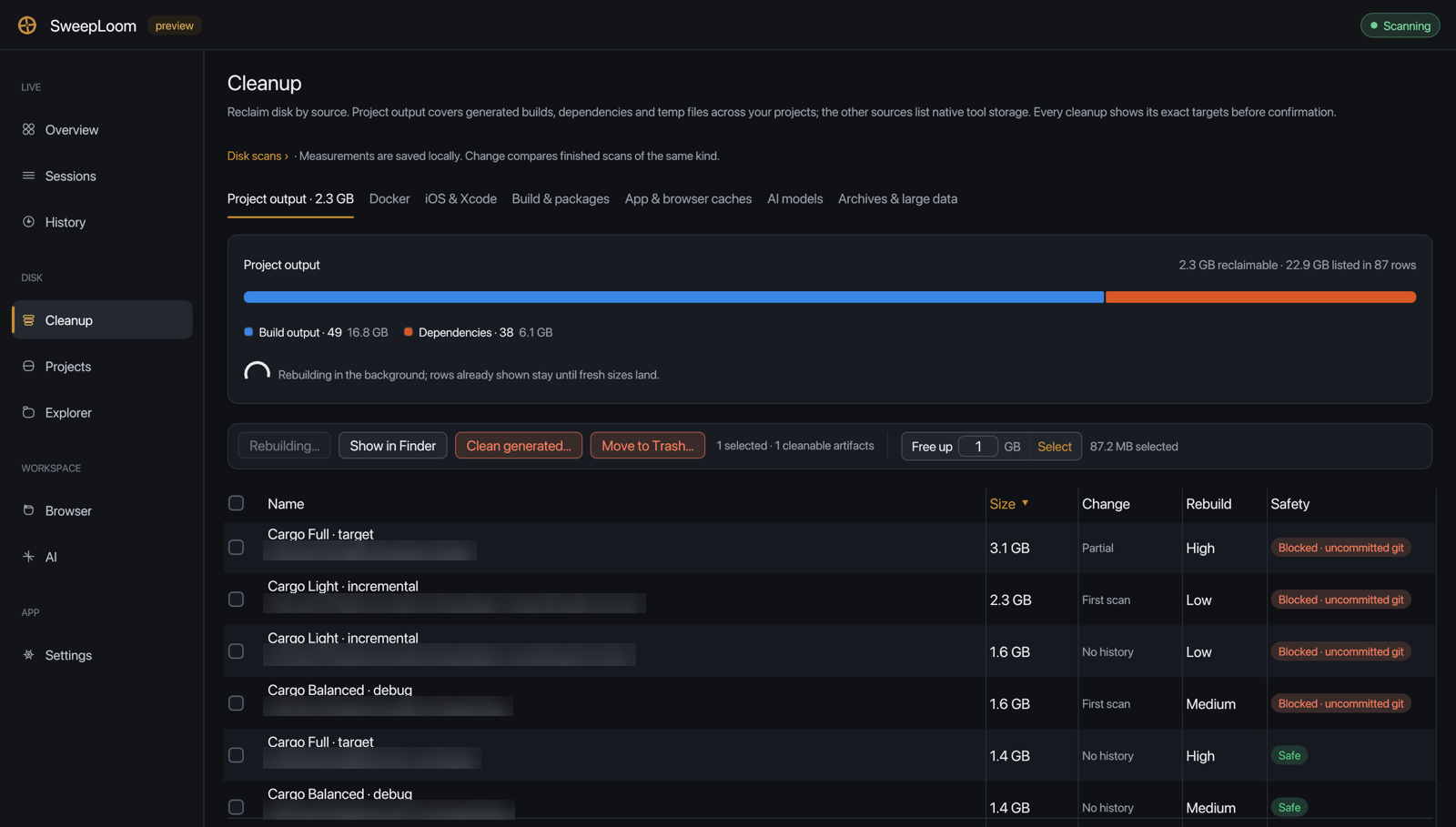
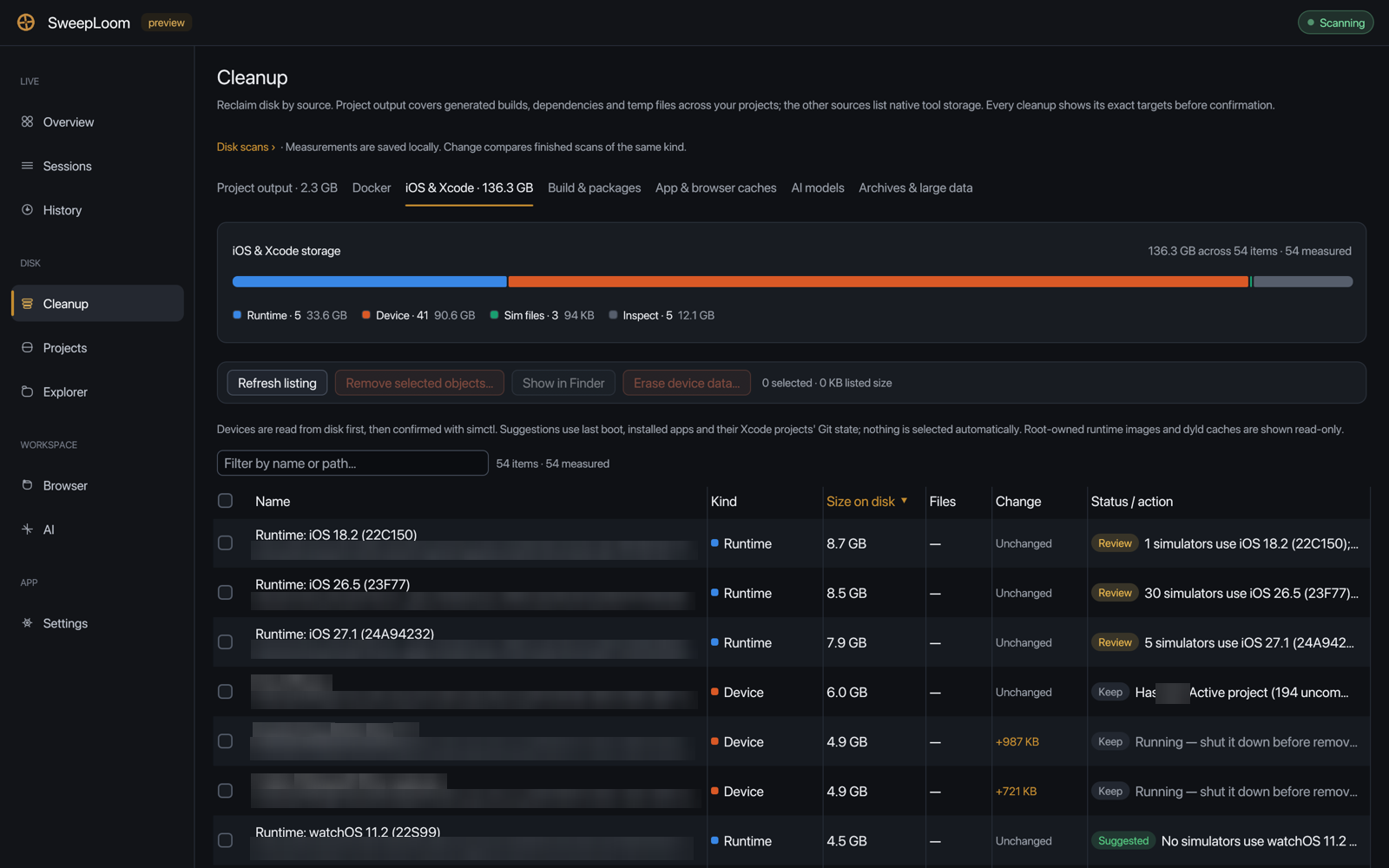
- Free up N GB → Select picks eligible Project output rows until the target is met: cheapest rebuild first, then largest. Rows blocked by uncommitted Git changes, an active process or a recent write cannot be applied.
- In iOS & Xcode, devices whose runtime is gone are offered as one row that deletes exactly the listed shut-down UDIDs, never a blanket simctl delete unavailable, and aborts if that set changed.
- User data (archives, backups, downloaded models) goes to the Trash, which is restorable; its space stays used until you empty it.
- Each tab keeps its listing, selection, filter, sort and scroll position. Scans keep running in other tabs or in the tray, and a refresh leaves the old rows visible until the new ones land.
Disk · 5 of 9
Projects
Every project under your developer folders, not just the folder the app started in, with full sizes, change since the last scan, and artifact summaries.
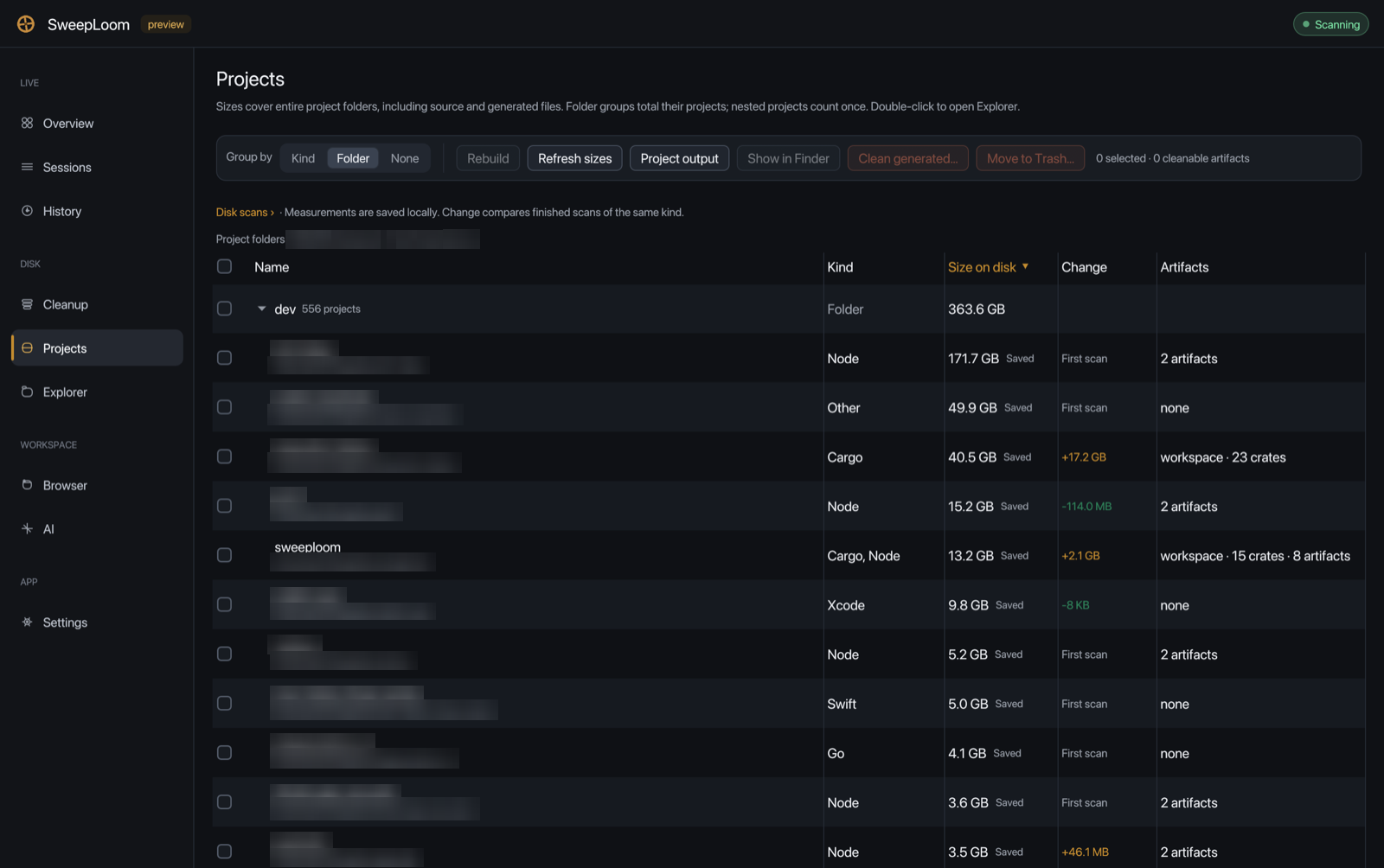
- Discovery covers dev, Developer, Projects, code, src, repos, work, Documents/GitHub, any *Projects folder and loose projects in your home folder, with fair per-folder budgets so one monorepo cannot crowd out the rest.
- Markers include Cargo, Node and Deno, Python, Go, Gradle and Maven, Swift, CocoaPods and Xcode, .NET, CMake, Ruby, PHP, Dart, Elixir, Zig, and plain Git repositories. Projects from your last Explorer scan are merged in.
- Sizes cover the entire project folder, source included. Folder groups total their projects and nested projects count once. Group by kind, folder or none.
- Saved sizes stay on screen, marked Saved, until fresh measurements replace them. Double-click a project to open it in Explorer.
Disk · 6 of 9
Explorer
A folder inspector for when you need to see where the space actually is.
- The scan runs in the background on a bounded worker pool; each file costs one lstat and folders fold into their parent as soon as their last child finishes.
- Sizes are allocated disk blocks, not apparent sizes. Symlinks are not followed.
- Expand with the arrow, select with the checkbox, right-click for actions, double-click to scan a folder. Collapsing never re-walks the disk.
- Finished scans are saved to History → Disk scans.
Workspace · 7 of 9
Browser
Real memory and CPU per browser. Tabs come from the optional companion extension and are never guessed.
3 views
Process trees
Live browser processes, memory and CPU. Open a tree to inspect its helpers.
Tabs
Companion tab table with last access: save to Later, discard, or focus.
Later
Saved tab titles and URLs, reopened without closing anything in the live browser.
- Without the companion, tab activity is shown as unknown, not as zero.
- Individual helper processes can be stopped on request; the browser process itself cannot.
- Pinned, audible, incognito and active tabs are never discarded or closed, and closing is never the suggested default.
Workspace · 8 of 9
AI
Inspect-first stores for Claude, Codex, Cursor, OpenCode, Gemini and Grok, classified by leaf name, with the always-on token estimate.
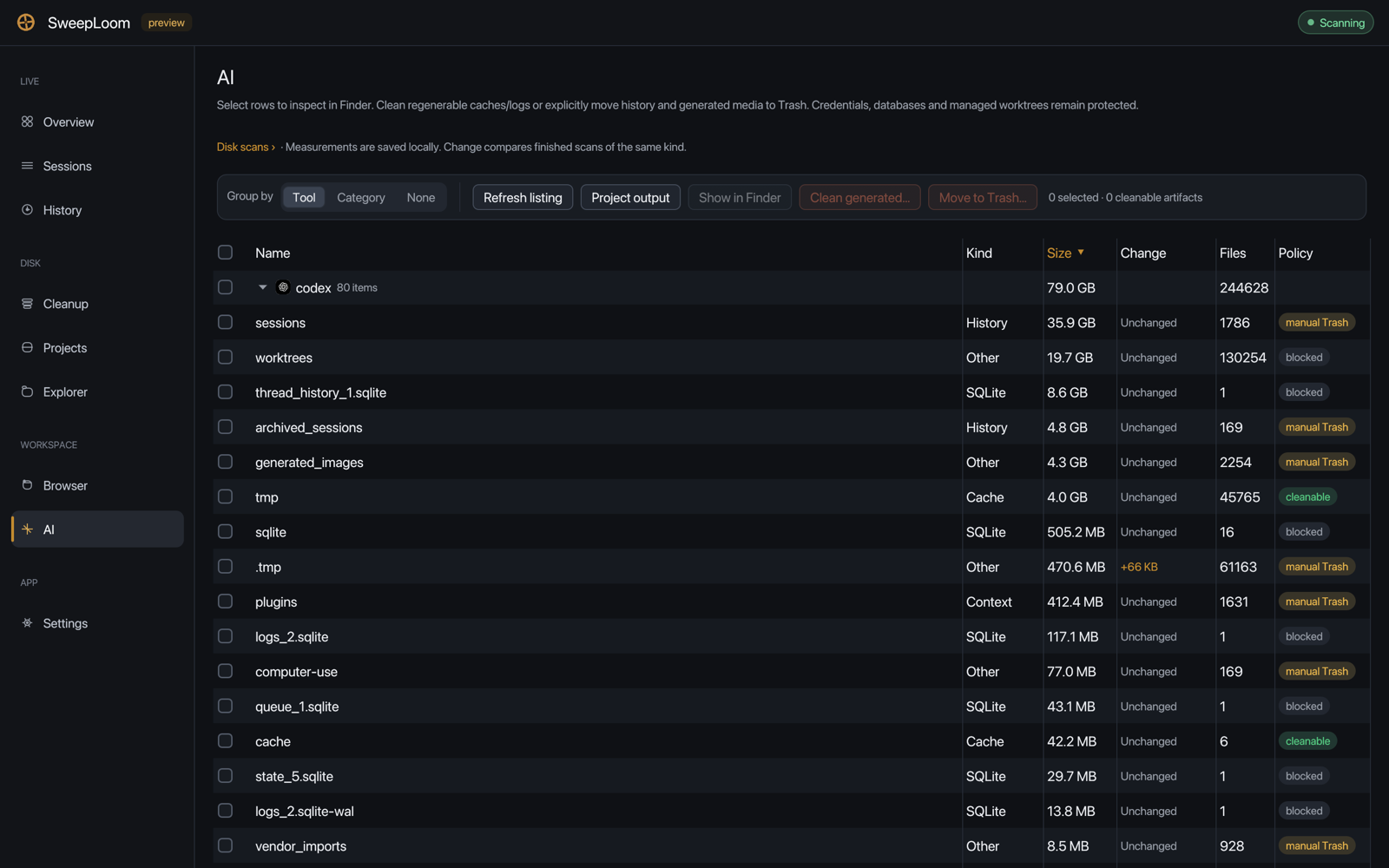
- Group by tool, category or none. Each row has a class (Context, History, Cache, Secret, SQLite, Log, Settings, Other) and a policy.
- Only regenerable caches and logs are cleanable. History and generated media can be moved to the Trash explicitly. Credentials, databases and managed worktrees stay protected.
- History is archive and costs zero always-on tokens. AGENTS.md, *.mdc and rules are Keep; SweepLoom never flips alwaysApply.
App · 9 of 9
Settings
Local-only. Telemetry stays off, and there is no switch to turn it on.
- Appearance: Auto, Dark or Light theme, and interface size.
- Background: keep running in the tray when the window closes (Windows and macOS), start in the tray at sign-in (Windows), or launch hidden with sweeploom-gui --tray.
- About: telemetry (None), license, the local home and config paths, and the hidden-launch command.
One safety model
The app is a reviewer. You are the one who confirms.
The same rules as the CLI and MCP, plus the checks that only a desktop app with native tools needs.
Plan
Rows are built from metadata. Only SAFE generated rows can be pre-selected, and native objects are never selected for you.
Revalidate
Before acting: live working directories, executables and arguments, running simulators, in-use Docker objects, loaded Ollama models.
Execute
Generated output is deleted; user data goes to the Trash; Docker, simctl, Ollama and rustup remove their own objects.
Receipt
A result line per action, and finished measurements recorded in History → Disk scans.
- Partial scans authorize nothing. An unreadable size stays unknown or partial, never an exact zero.
- Sizes are allocated blocks, so sparse simulator images do not promise space they cannot free.
- Idle agents are Keep. Stopping a session is a separate, confirmed action; browsers cannot be stopped from Sessions.
- If the app ever panics, the message goes to ~/Library/Logs/SweepLoom/panic.log on macOS (SweepLoom/panic.log under %LOCALAPPDATA% on Windows, ~/.local/state on Linux).
Build it from source.
The app needs Rust 1.95 or newer and is optional; the CLI and MCP server do not need it. On macOS, build the signed app bundle so folder permissions survive updates.
$ git clone https://github.com/Weavatrix/sweeploom.git$ cd sweeploom$ cargo run --release -p sweeploom-gui